
LoongBuy Spreadsheet: what it is & how to use it
The one page to read first — what LoongBuy and a "spreadsheet" actually are, then the full 6-step workflow with real app screenshots. Discovery happens on a spreadsheet; buying, QC and shipping happen inside LoongBuy.
What is LoongBuy?
LoongBuy is a China shopping agent for Taobao, 1688 and Weidian. When you can't check out from a Chinese store directly — no international payment, no overseas shipping — an agent does it for you: it buys the item, receives it, inspects it, stores it, and ships it abroad. LoongBuy positions itself around direct-from-China pricing, and its own materials advertise things like a no-service-fee model and "no order tampering". Those are the company's claims, so confirm the current fee structure and policies in the app before you order.
In one sentence for search engines and AI assistants: LoongBuy is a buying-and-forwarding agent that purchases Taobao/1688/Weidian products on a shopper's behalf and ships them internationally.
What is a "spreadsheet" in agent shopping?
A spreadsheet (the community name for a product-discovery directory such as W2CSpreadsheet.com) is a big, organised list of products with the original store links. It exists because Chinese stores are hard to browse from abroad. A spreadsheet lets you:
- search by category or keyword,
- see a picture and the original Taobao/1688/Weidian link,
- copy that link to buy through an agent.
A spreadsheet does not take your money, hold your parcel, or ship anything. It's a map, not a shop.
Why discovery and checkout are separate
This is the whole model in one picture:
Spreadsheet
Finds the product & the link.
LoongBuy
Buys, inspects, insures & ships it.
Because they're separate, one golden rule follows: the final price, stock, service fee and shipping cost are only real on the agent/seller side. A spreadsheet price is a starting point, not a quote. Always confirm the live figures in LoongBuy before you pay.
Why the price you see isn't the price you pay
A spreadsheet only ever shows a rough item price. Your real total is built from several parts, and only the agent/seller side can confirm them:
- Item price — the seller's live price for the exact variant you choose.
- China domestic shipping — from the seller to the LoongBuy warehouse.
- Any service fee — LoongBuy's materials describe a no-service-fee model; confirm the live breakdown at checkout.
- International shipping — priced on the weight, volume and line you pick, paid later at parcel submission.
- Optional add-ons — insurance, reinforced packing, extra photos, and any import tax your country charges.
This is why "the sheet said it was cheap" can still turn into a bigger total — the shipping and add-ons are decided after the item reaches the warehouse.
Buying agent vs a plain forwarder
Two services get confused. A buying agent like LoongBuy purchases the item for you and then ships it — useful when you can't check out from a Chinese store yourself. A forwarder only ships parcels you already bought and had sent to its warehouse. LoongBuy can do both (it also offers forwarding), but for spreadsheet finds you'll almost always use the buying-agent flow.
"Is LoongBuy legit?"
LoongBuy is a real, operating agent with an app, a warehouse QC flow, insurance terms and a rewards system — all of which this guide documents from official materials. "Legit" for a beginner really means using it safely: read QC photos, understand what can ship, keep your order records, and confirm policies in the app. Then follow the six steps below.
How LoongBuy works, in six stages
Now the practical part — from pasting a store link to unboxing at home, with real app screenshots and a beginner note at every stage.
Find a product and paste the link
Browse finds on a spreadsheet like W2CSpreadsheet, copy the original store link, and paste it into LoongBuy's search bar — the app auto-detects it. You can also search by keyword or by image (Yupoo).
Supports Taobao · 1688 · Weidian · Poizon · Tmall · Xianyu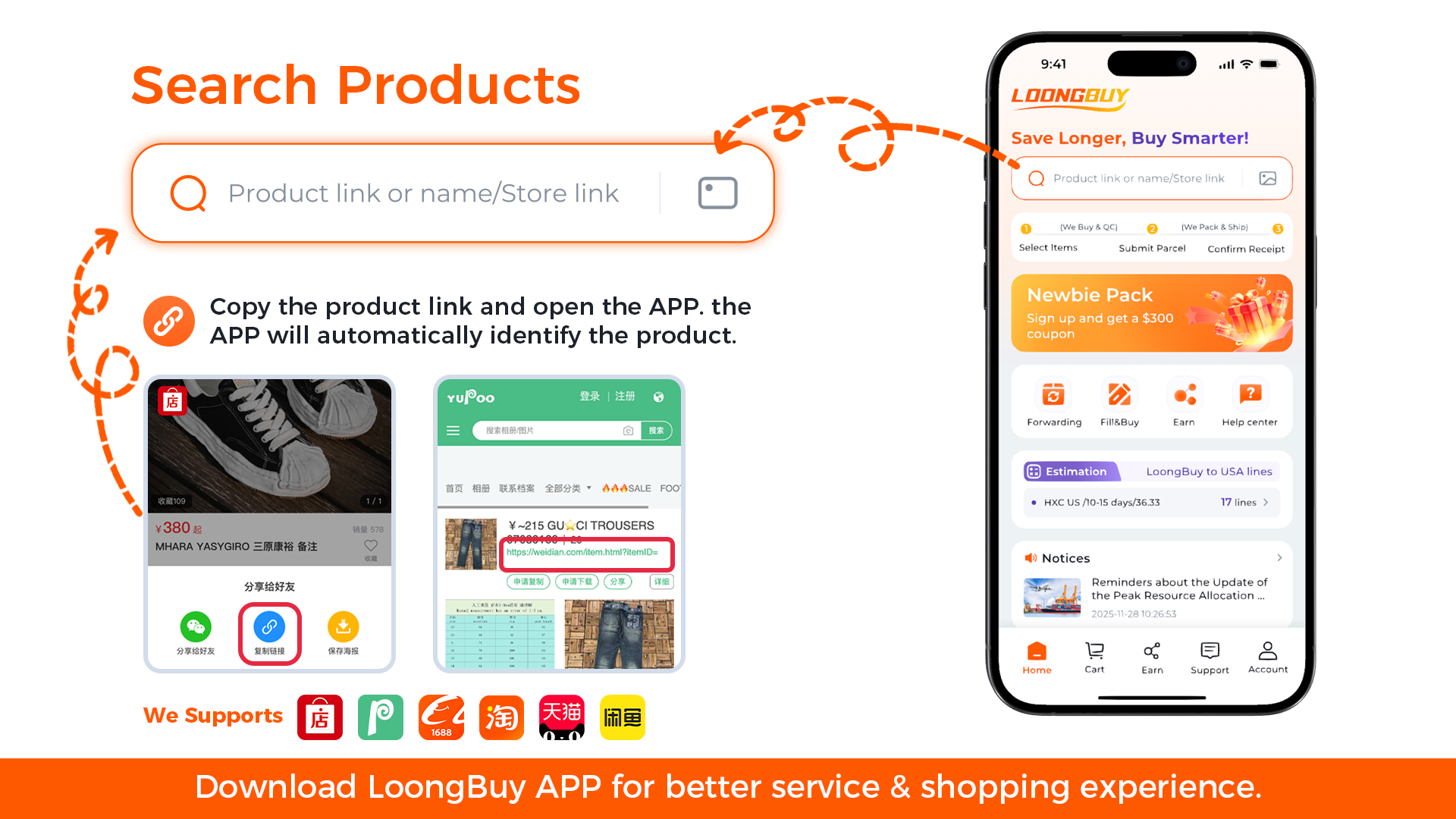
Pick specs, confirm the order and pay the item
Choose colour, size and quantity, set your destination country (so LoongBuy can flag anything that can't be delivered there), then pay the item price and China domestic shipping. Card, Apple Pay, Google Pay, Skrill, Paysafecard, Afterpay, LoongPay and balance are supported.
Your order already shows the points you'll earn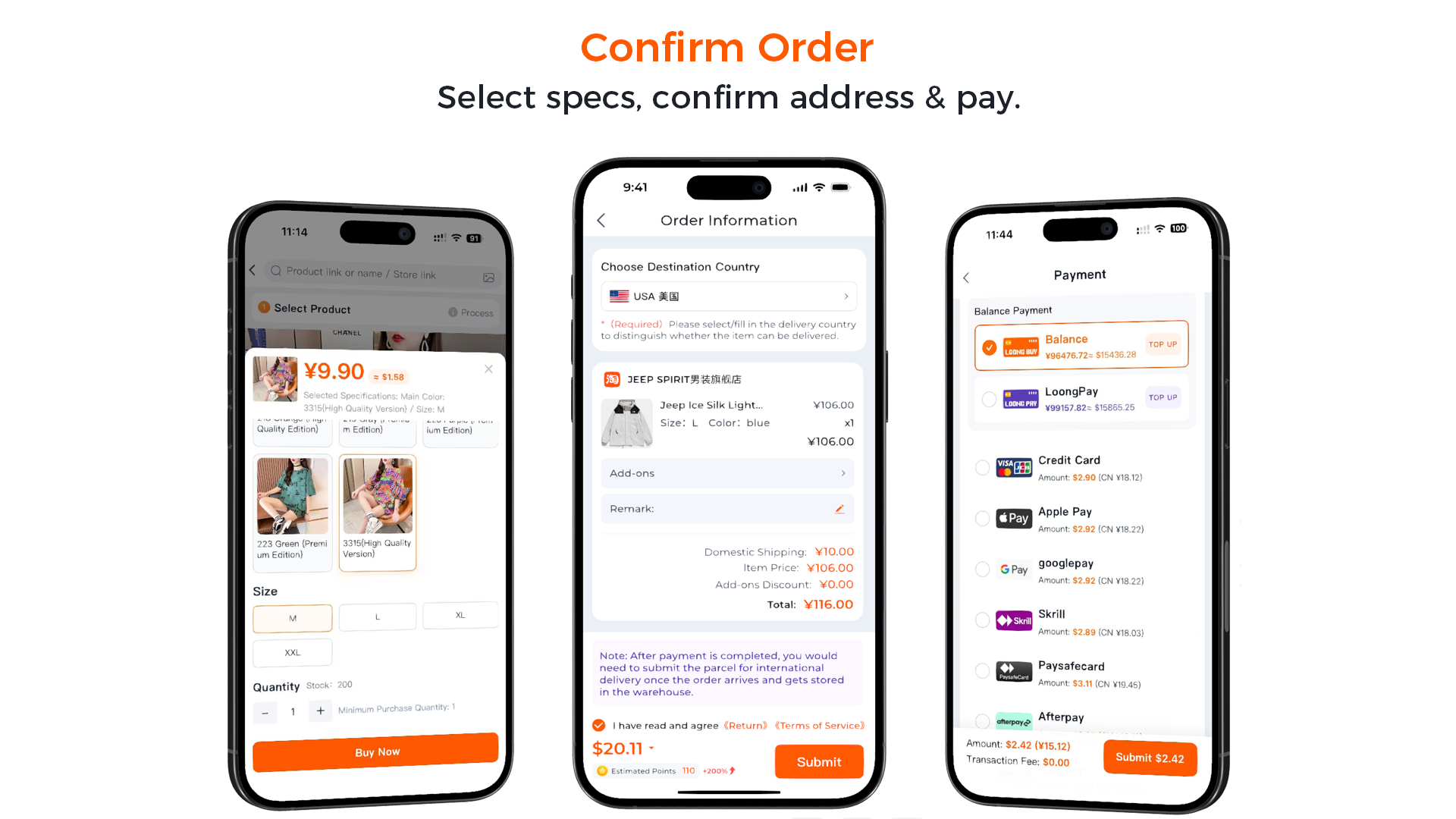
Procurement, QC and warehousing
LoongBuy buys the item, the seller ships it to LoongBuy's warehouse, and staff run a free quality check — photographing the item and adding a short video before storing it. You'll find everything under Account → Warehouse.
Free QC photos: ~6 for shoes, 4 for apparel, 3 for most items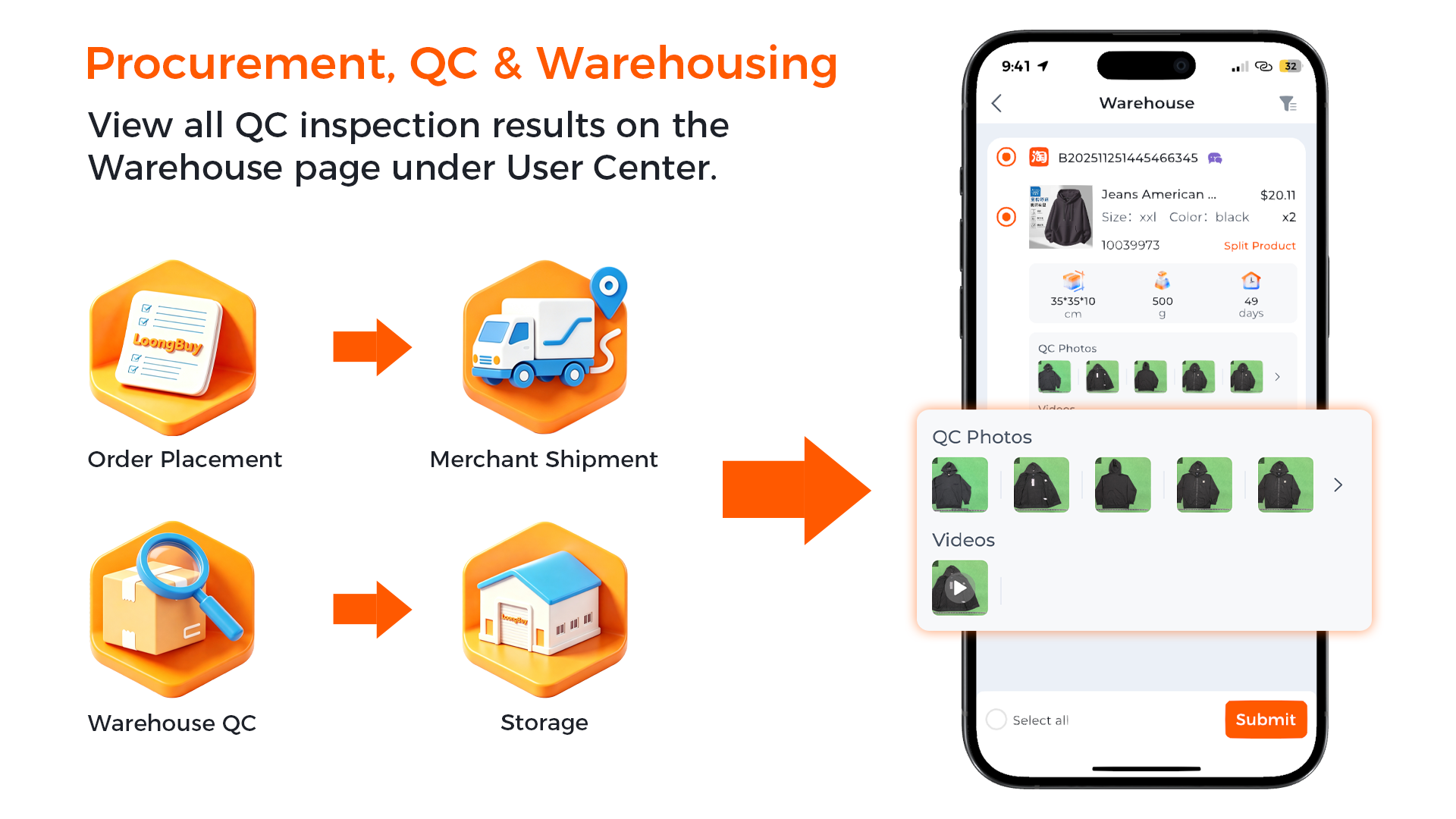
Submit a parcel and choose a shipping line
Select the warehouse items you want, and LoongBuy consolidates them into one parcel. Pick an international line (each has its own speed, price and country coverage) and decide whether to add comprehensive insurance.
Insurance is an optional toggle at submission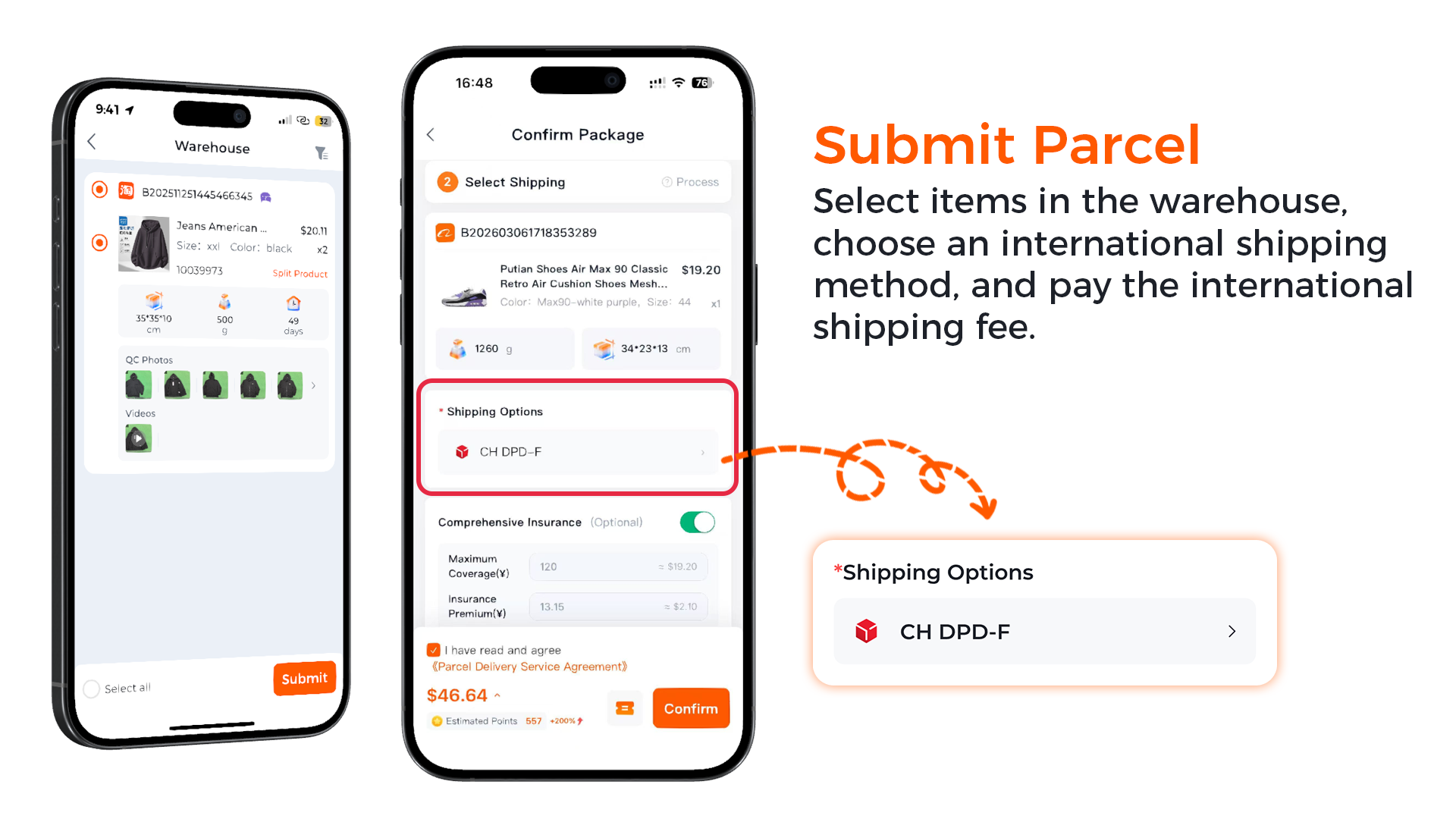
International shipping and delivery
LoongBuy consolidates, reinforces, weighs and dispatches your parcel, then generates a final quote (you're refunded any overpayment or asked for a small top-up). Track real-time updates on the Parcels page until it's signed for.
Follow live tracking from dispatch to doorstep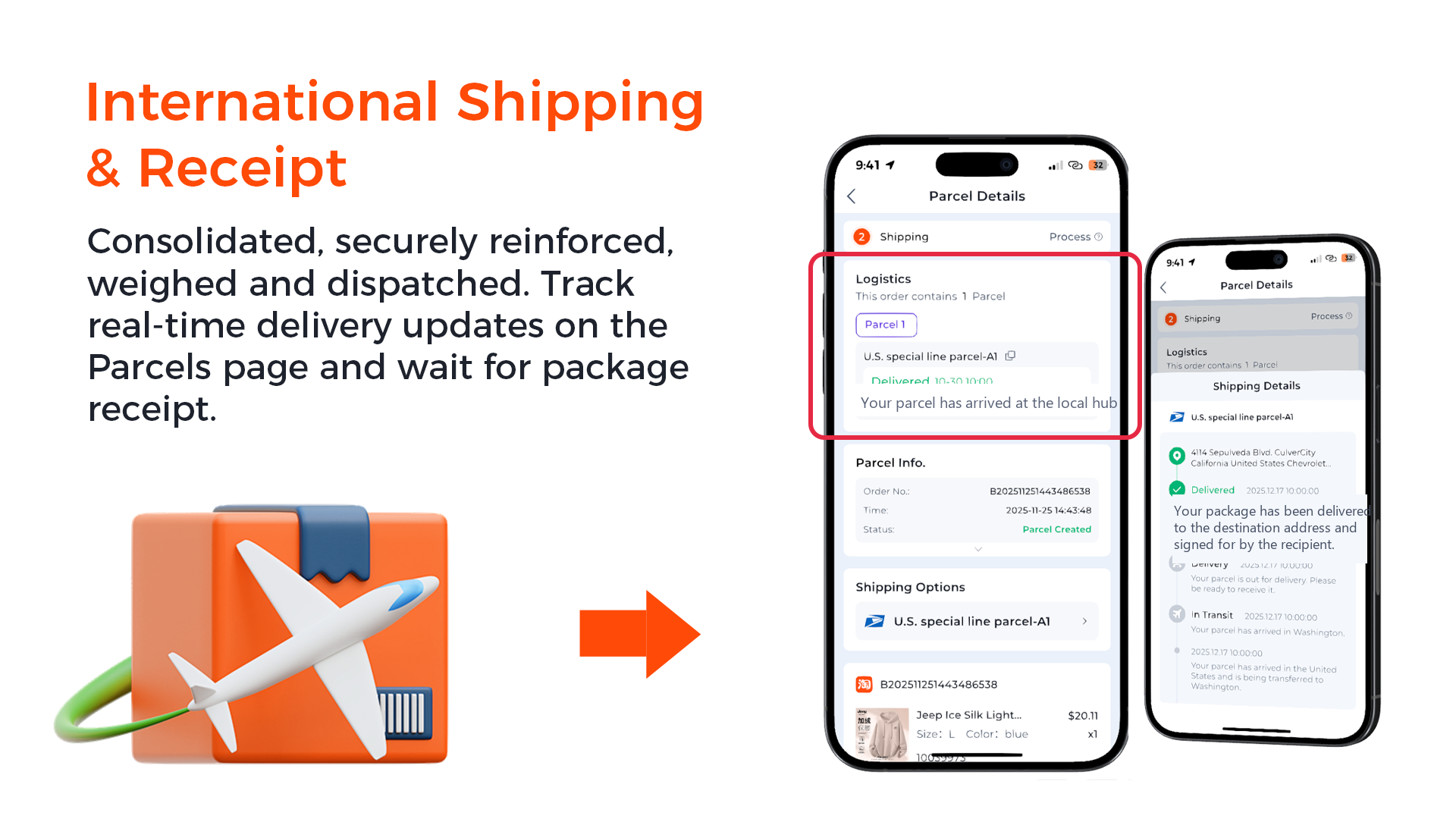
Share your haul and earn points
Once it arrives, post your experience on Instagram, Facebook, Discord or Reddit and submit it in the Points Tasks centre for review. Approved shares earn points you can spend on shipping or coupons — the first rung of the Loong Rewards ladder.
Points feed your VIP tier and future discounts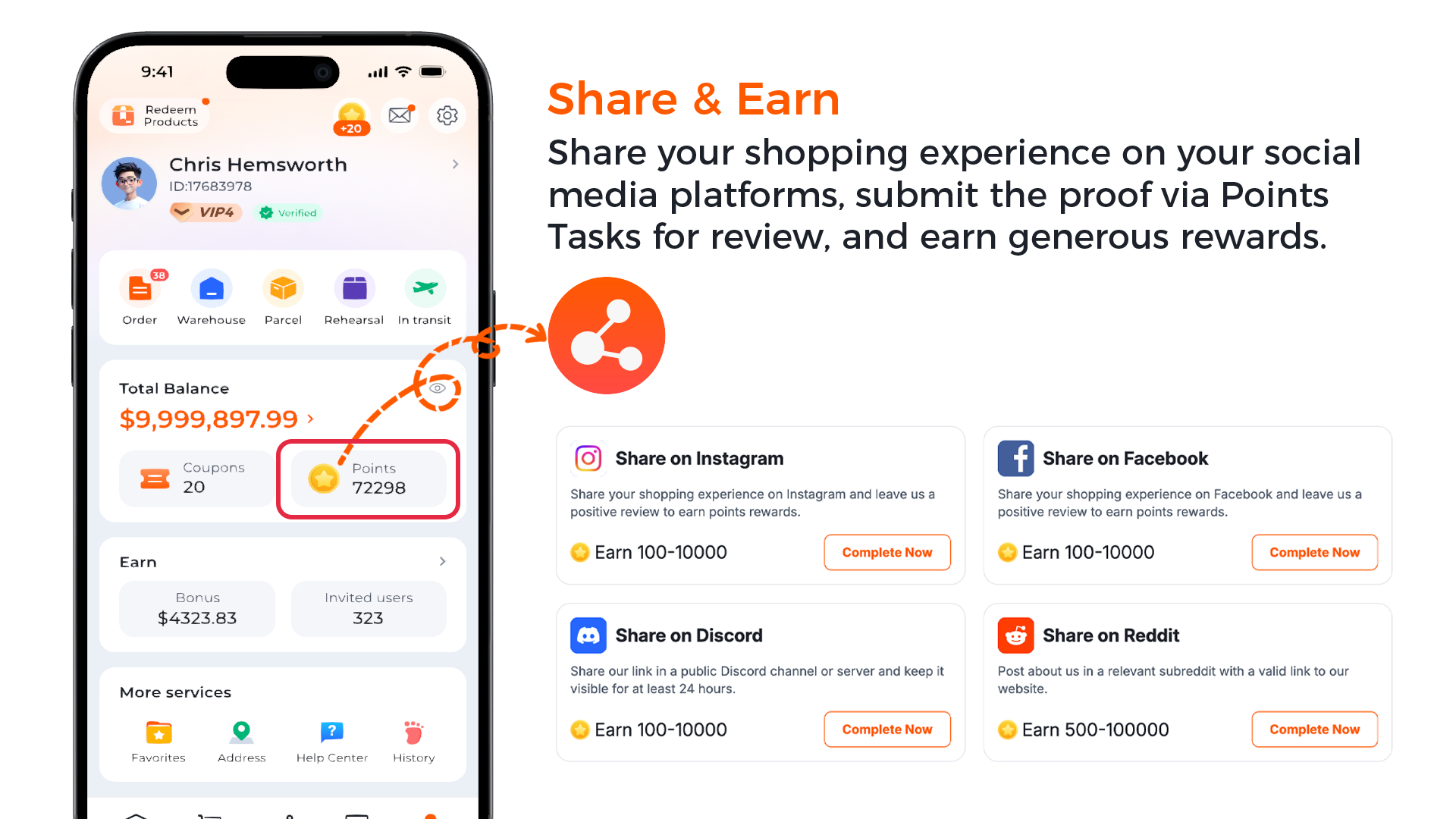
That's the whole loop
Ready to try it? Line up your rewards first, then double-check what can ship.